Ubiquiti Lite AP GPS LAP-GPS
KSh 18,000.00 Exclusive of 16% VAT

Handboss Universal Foam Cleaning Agent
KSh 299.00 Exclusive of 16% VAT
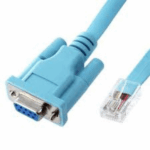
Console Cable RJ45 to Serial RS232 DB9 Female Cable
- DB9 RS232 female to RJ45 female cable for TCP/IP network interface with the dual-way conversion, with the serial port network function, support serial data and network data bi-directional transparent transmission
- Connect the equipment serial port to the RJ45 console port on routers
- Compatible with most routers on the market, such as for Cisco or TP-link, etc
- Oxygen-free copper transmission wire, high-speed clear signal transmission
KSh 999.00 Exclusive of 16% VAT
Description
Console Cable RJ45 to Serial RS232 DB9 Female Cable
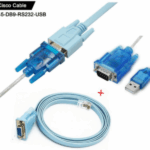
- Replaces RS232 (DB-25/DB-9) serial port perfectly, connects to any laptop/PC’s USB port directly to a console port like a charm. No more RS232 Female and male adapters; Note: This is Not a USB Ethernet Cable.
- An essential accessory of branded routers, switches, firewalls and wireless LAN controllers with CONSOLE port, such as Cisco, Ubiquiti, Juniper, Fortigate, Mikrotik, TP-Link, Huawei, HP ProCurve devices and more. Our unique cable works flawlessly and quickly on laptop and desktop computer.
- Check out the new USB to RJ45 Console Cable Simply put, our 6 foot, Cisco compatible Blue RJ45 to DB9. Rollover Console Cables (or management cable) are null modem cables that allow users the ability to communicate and configure a networking device. These particular null modem cables are “rolled over” meaning that on connector A pin 1 connects to pin 8 on connector B, pin 2 to pin 7 respectively and so on. The wiring is exactly opposite on one connector as it is on the other. This wiring allows users to configure various network devices by attaching the DB9 female portion of the cord to the serial port on your computer, and the RJ45 plug into the device (router, firewall, switch etc.). Why make the switch? This type of one piece cable replaces older “kits” that contained multiple cables and adapters.
- It’s something of a standard, but despite that, it’s designed to communicate with terminals that have the DB9 port. If you want to connect it to a PC or laptop, you’ll likely need an additional adapter between the DB9 end and your USB port.